Substance Designer Procedural Texture Pipeline
Recently for a project, I was tasked to come up with a pipeline where the team needed to texture more than hundreds of assets in a short amount of time. So I came up with this pipeline where we use substance designer's procedural workflow to quickly texture models and assets.

An Overview of Entire Network.

this is Multi material Blend node. It takes multiple texture sets as input and a color ID map.

These are the maps baked using a custom tool in maya. For this explanation purposes it is chamfered beveled cube details with different materials on each side baked down to a default cube. (ID maps + Normal Map)
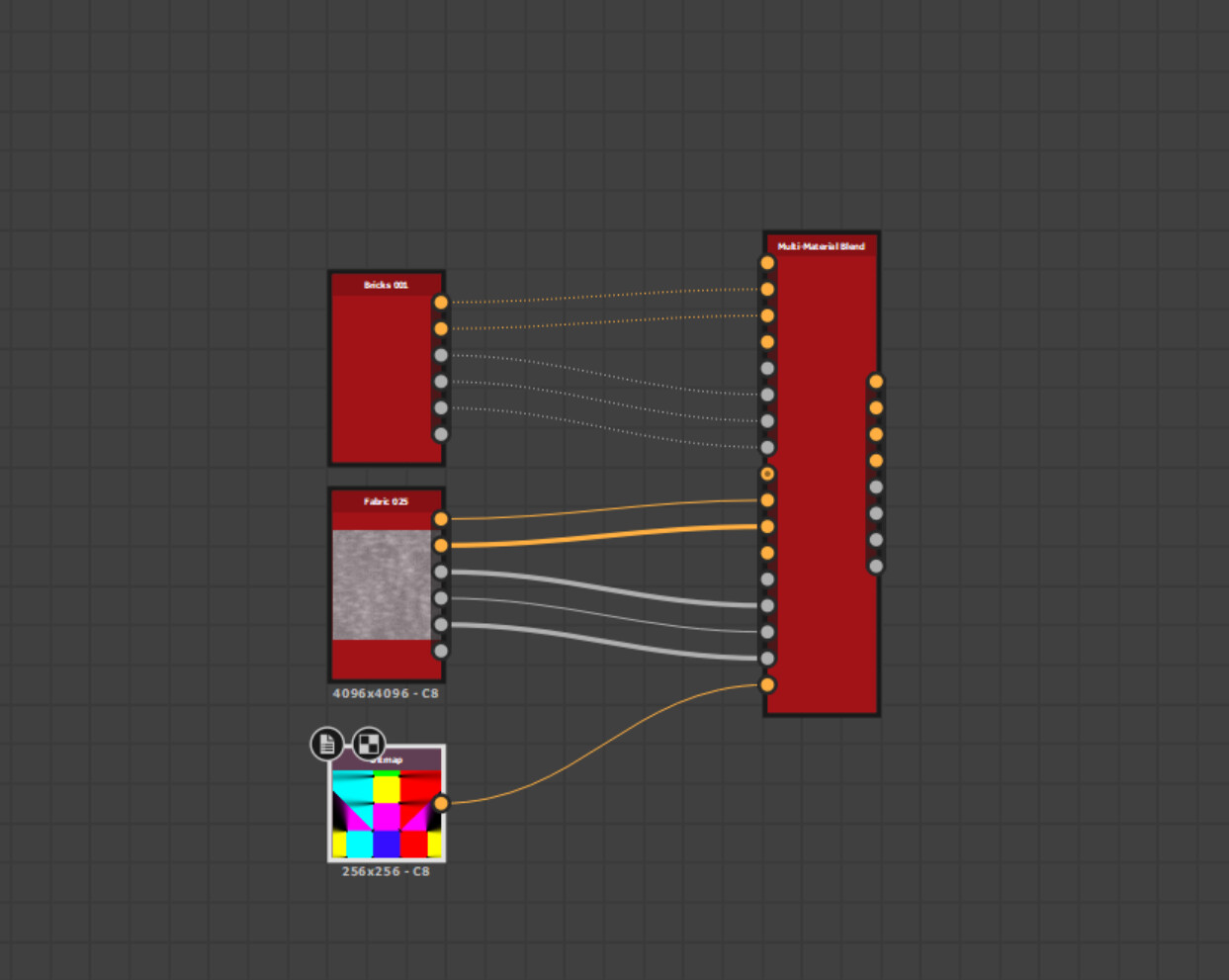
You can plug in the texture sets in this manner along with the color ID map.

For this demonstration I used 6 different texture Sets that can be found in default substance designer library. Once the maps were plugged in the cube was linked to the file so that user can preview the textures real time.

Once the materials got assigned, to their respective color IDs. we can blend the baked normal maps with the textured ones using the normal blend node.
And this is the result we get once we connect the output node the model. But this is very "clean". It needs a bit more details on it.

Thanks to procedural workflow of substance the artist can then add more details to the model by plugging in custom maps or other imperfection maps to add the details to it.

And this is the final result we get!

These are the output maps that can be later exported, directly from the graph. Hope this helps you and you find it useful!